OpenLake: Fast, Durable Storage for LLM Inference and Training
Compute is abundant, storage isn't. OpenLake saturates the storage path 8× throughput, 600 µs reads, and a link that carries more bytes per second than its rated bandwidth.
Today we're releasing OpenLake, an open source storage system built to saturate GPUs, delivering 8x throughput of conventional object stores, ~600 µs on small object reads, serving over a million concurrent IOPS.
Modern GPUs have made computers abundant, but storage systems are unable to keep up. LLM inference and training rely on small random I/O, feeding data to GPUs efficiently is challenging and surprisingly slow even on expensive hardware.
OpenLake combines a thread per core engine with RDMA and our new deferred materialization architecture, delivering 8x higher throughput than conventional storage, and going as low as ~600 µs on small object latency while sustaining over a million concurrent IOPS.
Beyond State of the art:
We compare OpenLake to some popular storage architectures like RustFS/MinIO/Ceph and evaluate 2 scenarios: small I/O (4KB read and write) and large I/O 128MB read and write.
In our experiments, OpenLake achieved 1M+ concurrent iops on a 96 node cluster and maintained a P99 tail latency of 4 ms. The lowest latency was 0.6ms for small I/O, and able to achieve 8x improvement in throughput compared to MinIO and RustFS.
The Secret Sauce: Thread per core design
Small file serving for GPUs is dominated by three costs: metadata lookups, cross core contention, and blocking syscalls. Each memory copy from NIC to the GPU adds latency and affects TTFB (time to first byte).
OpenLake implements a pinned thread per code design, where every thread is mapped to a single physical CPU core. A request is served start to finish by the same single core, the per core L1/L2 caches stay warm for the request blocks and don't suffer from cross core movement. Further, all kernel I/O goes through io_uring, we place all commands on a submission queue and reap completions from a completion queue, so the engine never blocks for syscalls waiting for disk.
This allows OpenLake to achieve near same latency at P50 and P99 levels at high throughput, with predictable throughput and low CPU overhead.
Deferred Materialization:
Interconnect and PCIe bandwidth set the ceiling on how fast data reaches GPU memory. At a network interconnect of 200 Gb/s (or 25 GB/s), it takes 2 seconds for a 50GB payload to arrive in the GPU memory. This was a long assumed hard limit, OpenLake breaks this ceiling by introducing logical throughput, many multiples more than the physical throughput.
With deferred materialization enabled, OpenLake provides lossless client side fused compression on the client GPU nodes before data leaves for storage, and decompresses it on arrival at over ~600+ GB/s decode throughput, more than 20× the ~25 GB/s line rate. Fewer bytes cross the wire, and because decompression (under 0.5% of the GPU) far outruns the NIC, bytes are decoded faster than they land. The link now carries more logical bytes than its rated bandwidth, so a fetch finishes sooner than an uncompressed transfer over the very same NIC, - at a smaller storage footprint, with the payload materialized on the GPU only when it's actually needed. More details on deferred materialization in our part 2 blog series on KV cache retrieval on hot paths. To avoid disruption to user code, we introduce our own FUSE adapter with cuda kernel required for compression, the adapter also auto-detects usage patterns to detect if the payload is suitable for compression based on the NIC line rate, and fires compression to OpenLake storage.
RDMA and PacedRDMA
OpenLake uses RDMA (Remote Direct Memory Access) for both inter-node and intra node traffic. Letting the engine bypass the CPU completely on both the target and source machines, GPU direct RDMA ensures that OpenLake can directly load GPU RAM from the NIC, leaving the throughput largely bound by the client's Pcie bandwidth. OpenLake is able to saturate the PCIe to 96% on an A100 retrieving KV blocks from remote storage.
Bypassing kernel space means giving up what the kernel provides in the TCP paradigm, congestion control chief among it. OpenLake has to serve many clients at once and manage their quotas fairly. That is hard for bursty workloads like inference KV retrieval, where a single request can fire thousands of KV block retrievals and overwhelm conventional credit based schemes.
We introduce PacedRDMA, a dynamic credit leasing strategy that watches historical per client usage, grants oversubscribed excess credits to clients doing heavy I/O point in time, and reclaims them from idle ones, this allows OpenLake to absorb heavy bursts of requests without changing the SQ and CQ sizes and and makes better use of pre posted memory buffers for two sided RDMA.
Decentralized metadata:
A centralized metadata store is a single point of failure, and it adds a round trip to every request. OpenLake has none.
Data placement is decided by hashing the object's location. The node that owns the data also owns its metadata, stored as local files tracking versions, permissions, size, ownership and other object-specific attributes, with an in-memory write-through cache keeping read latency down.
Each node also maintains a local pool of file descriptors opened through o_direct and also buffered through page cache. The engine picks between them depending on the access pattern and the size of the data.
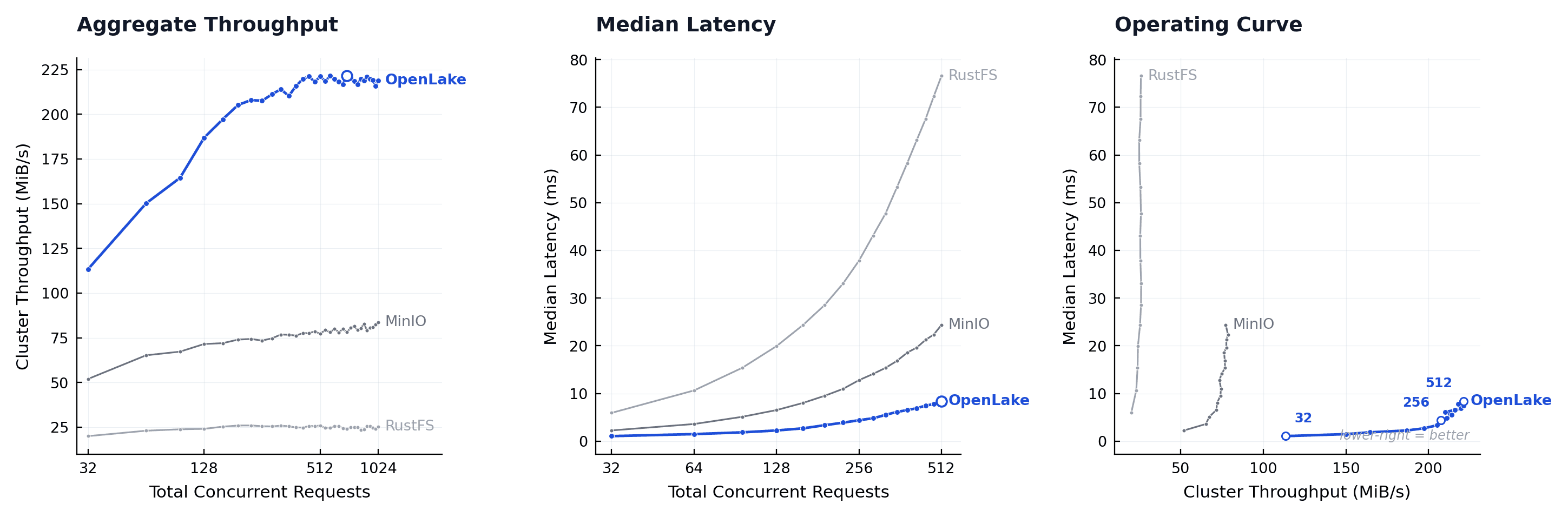
OpenLake vs. MinIO and RustFS: throughput and latency
Get started with OpenLake
OpenLake exposes S3 API, needing a simple config change in existing workloads, no code changes every call conforms to the S3 standard.
OpenLake is open source under Apache 2.0.
To run OpenLake on a scratch VM:
1. Install the build dependencies and the AWS CLI.
2. Install the Rust toolchain, then clone and build the daemon.
3. Create the data directories and start the server.
4. Point the AWS CLI at OpenLake and verify the S3 API.
GitHub: github.com/openlake-project/openlake
Discord: Invite
Get Involved: See more
Contact Us: Drop a message